|
Frequently Asked Questions
How do I update
the MVPS HOSTS file in Windows 10/8
I'm using a Proxy from my ISP, but the HOSTS
file doesn't seem to work?
After using the HOSTS file my machine
seems slower?
Why doesn't my Back Button return me to the
previous page?
How do I Edit the HOSTS file?
Why do I see "hmm we can't reach this page" (Microsoft Edge)
Why do I see "Navigation to the webpage was cancelled"
(IE 8 - 11)
How do I eliminate the Navigation Cancelled
Message? (IE) (Firefox users)
Why do I see the "unable to connect" message
(Firefox only)
How do I rename the HOSTS file?
How do I lock the HOSTS file to prevent other
users from changing it?
Can I use the HOSTS file if I'm running a
"Server"?
Are there any Utilities to monitor and protect
the HOSTS file?
How do I troubleshoot a problem with my
connection?
How do I contribute a listing for the HOSTS
file?
I'm not sure how to Extract (unzip) the
HOSTS file
Why do I get a Password Prompt when
unzipping the download?
How do I know all these entries are valid?
What are all these comments after the
entries?
For Issues with Downloading or Extracting
the HOSTS file
How do I know if the HOSTS file is working?
Why do I see the "HOSTS file too large" in
SpySweeper
Is Merging the MVPS HOSTS file with others
recommended?
Do other programs add entries to the HOSTS
file?
Why do I see "Access Denied when updating the
HOSTS file? (ZoneAlarm)
How do I Update or Edit the HOSTS file for
ZoneAlarm Pro or Security Suite users
Why can't I view the videos at
my favorite sites?
Why do I get an error trying to Save a
webpage in Internet Explorer?
Why does Symantec detect a
possible malicious entry in the HOSTS file?
Tip for Norton 360 users -
Tip for Norton Security users
Why does Spyware Doctor detect "Possible
Website Hijack" in the HOSTS file
Why does Trend Micro Sysclean detect and remove
certain entries in the HOSTS file

Proxy and the Windows HOSTS file
If you are connected to the Internet using AOL, a custom dialer
provided by your ISP, through a Local Area Network (LAN) connection
or a remote proxy server these procedures (using a HOSTS file) may
not be effective. Programs such as some "web accelerators" may no
longer work if you overwrite the existing HOSTS file as these type
programs add entries to the HOSTS file.
Using a remote proxy server which basically does the DNS requesting
for you does prevent the HOSTS file from being considered. In other
words ...Your browser will route its request through your proxy
server before your machine looks up an entry in Hosts.
Possible Work-around: (If you are using a proxy server)
[return to FAQ]
In IE go to - Internet Options | Connections [tab] and choose your
connection.
Make sure the box called "bypass proxy server for local addresses"
is checked.
Example: click the LAN Settings button, select: Proxy Server
"Bypass proxy server for local addresses", click the Advanced
button.
Add: 127.0.0.1 click Ok, Ok
Editors Note: these type changes should only be made on a
"stand-alone" machine. If you are "Networked" you should check your
configuration prior to making any changes.
These type (proxy) problems may also occur if you changed ISPs and
the previous settings were not removed properly. Or if you have had
a previous "Spyware/Adware" problem, it may be possible that the
infection may have altered your system settings. You can determine
this by running
HijackThis and see if the following entries exist.
(these are just a few examples)
R1 - HKCU\Software\Microsoft\Windows\CurrentVersion\Internet
Settings,ProxyServer = 127.0.0.1:8080
R1 - HKCU\Software\Microsoft\Windows\CurrentVersion\Internet
Settings,ProxyOverride = local
Note: always check with your current ISP before making any changes,
or you may lose your Internet Connection.
Strange behavior in
the Internet Explorer Back Button
Sometimes when you click the Back button in Internet Explorer to return to the previous
page it appears that nothing happens. What usually occurs is that
the HOSTS file has blocked one or more (<IFrame>) ad pages that are
embedded into the web page you are viewing. These "IFrame" are
actually a separate connection, thus the browser reads it as a
visited page ...
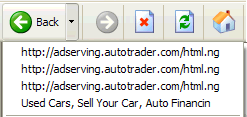
Martin Hawes sends along this tip: |
To verify this click the small drop-down arrow
on the Back button, do you see just an ad server listed? ...
well now you know ..... As you can see the first three links are
blocked ad servers, simply skip to the valid link. However there
are a few exceptions. In some cases the web page can contain a
script to prevent the user from returning to a previous page.
|
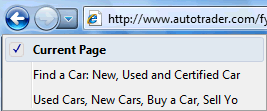
If you add the "ad servers" you see listed in
the Back Button drop-down, to the
Restricted Zone
this should eliminate the Back button issue.
 |
IE8 - 11 In the event you do see ad servers listed in
the Back Button ... check the following settings: Internet
Options > Security tab, highlight the Internet icon,
click the Custom level button
Scroll down to the below options and set to Disable ... click
Ok, Apply
|
- Launching programs and files in a IFrame = reset
to Disable ...
This is the single most exploited
setting in Internet Explorer!
There are no legitimate sites that I know of that use this
option ...
- Websites in less privileged web content can navigate into
this zone = Disable
Then add the "ad server" you see listed in the drop-down menu
to the Restricted Sites. The key
here being once you add an entry to the Restricted Sites, they
are considered "Websites with less privileges" and cannot
navigate (create a separate connection) in the "Internet Zone". Not only does this eliminate the entry
in the drop-down list ... it also removes the "Navigation to the
webpage was canceled" message you see on some web sites
that uses the "IFrame".  Creating a HOSTS Editor
[return to FAQ]
Creating a HOSTS Editor
[return to FAQ]
To edit your HOSTS file you can create a custom Desktop or Quick
Launch shortcut.
Note: the below locations are for the default paths, edit as
needed.
Right-click on the Desktop, select: New > Shortcut (and paste the
following)
Target: C:\WINDOWS\NOTEPAD.EXE
C:\WINDOWS\SYSTEM32\DRIVERS\etc\HOSTS
Start In: C:\WINDOWS\SYSTEM32\DRIVERS\ETC
Or put a Notepad shortcut in your SendTo folder
Start | Run (type) sendto (click Ok)
File > New > Shortcut
In the command line, (highlight and paste the below)
C:\WINDOWS\NOTEPAD.EXE
(provided Windows is the default location)
Then simply right-click on the HOSTS file and select: SendTo >
Notepad (Screenshot)
Windows
10/8
You can use the same method above, (screenshot) however after creating your
Shortcut you will need to right-click the shortcut and select:
Properties, click Advanced and select: Run as Administrator, click
Apply/Ok. (Screenshot)
Or you can simply use Notepad to edit the HOSTS file (requires
elevated privileges)
Start > Search > (type) notepad.exe
Win8 users - Charms
Bar > Search > (type) notepad ... select Notepad in left pane
Once located, right-click and select: "Run as Administrator"
You can easily locate the correct folder location:
Start > Run (type) %systemroot%\system32\drivers\etc
Win8 users - Charms Bar > Search > (type) Run (type or copy and
paste) %systemroot%\system32\drivers\etc
This will open the desired folder, then right-click on HOSTS (no
3-letter file extension)
Select: Open and select: Notepad ... if you are unable to "see" the
HOSTS file you may need to enable "Hidden Files"
- Open Windows Explorer Tools > Folder Options > View
tab
Or Organize > Folder and search settings > View tab
Win8 Users > File Explorer > View > Options > Change Folder
Options > View
- Scroll down to the Hidden Files and Folders section
- Select: "Show hidden files and folders"
- Uncheck: "Hide file extensions for known file types"
- Uncheck: " Hide protected operating system files" Ok
the Prompt, click Apply, Ok
Editors Note: general users should reverse the above when
not in need as this exposes all system files, including several on
the Desktop (desktop.ini) which you do not want to mess with ...
Editing the MVPS HOSTS file
- You must maintain the proper format or else the entry will be
invalid.
- Entries are made invalid if they contain "http:" or an
ending "/" slash.
- IP addresses are invalid as HOSTS
file entries. (re: "127.0.0.1 123.456.78.9" or "0.0.0.0
123.456.78.9")
- In the event you need to rename the file, use the below
batch
file.
- If you wish to disable an entry place a "#" in front
of the line.
- Each host entry is limited to 255 characters.
Important! When editing the HOSTS file remember to File >
Save (only)
- Do not File > Save As
- Do not "associate" the HOSTS file with Notepad, this
occurs when you select the option to "Always Open" the HOSTS
file in Notepad. This will convert the HOSTS (no 3-letter
extension) file to a "text file"
In the event you need to edit the HOSTS file and are unable
(system message) it may be due to the "permissions" preventing you
from editing the file.
- Right click the Hosts file
- Click Properties
- Click the Security tab
- Highlight your user account in the list
- Press the Edit button
- Select (place a check in) Full control
Press OK in the various dialogue boxes to confirm the changes.
You can also
Add "Take Ownership" to Context Menu (recommended
Win8)
Tip: if you add Notepad to your SendTo menu, then you can
View/edit the HOSTS file that way.
- Win10 users - right-click the Start button > Run (type) shell:sendto (press Ok)
Win8
users - Charms Bar > Search (type) run and select: Run (left pane
- and type) shell:sendto (press Ok)
- File > New > Shortcut then click Browse and navigate to the
Windows folder, highlight "notepad.exe"
- Name your shortcut: Notepad and Ok
The actual HOSTS location for all Windows versions is defined in the following Registry key:
HKEY_LOCAL_MACHINE\SYSTEM\CurrentControlSet\Services\Tcpip\Parameters\DataBasePath
 Note:
HijackThis
(no longer updated)
can detect invalid entries or a "redirection" entry. Note:
HijackThis
(no longer updated)
can detect invalid entries or a "redirection" entry.
 Why do I see "hmm we can't reach this page"
(Microsoft Edge)
Why do I see "hmm we can't reach this page"
(Microsoft Edge)
The message you see on part of a web page is from a blocked advertisement
(entry in the MVPS HOSTS file). There is no way right now to
eliminate that message, since Microsoft Edge does not use
"Restricted Sites" ... (screenshot)
Why do I see a Navigation message?
(IE 8 - 11) [return
to FAQ]
The "Navigation to the
webpage was canceled" is usually generated by Internet Explorer
when entries in the users HOSTS file are preventing access from one or
more servers designated in the web page. In most cases this occurs
from 3rd party ad servers such as "doubleclick", where the "Navigation
canceled" message replaces an ad banner or advertisement in a hidden frame within
the viewing page.
To determine if this is the case, right-click the Navigation
message and select: Properties
Look at the entire "path",
(URL) you should see the listed entry. (screenshot)
In other cases the message ("page cannot be displayed") is displayed
when a user clicks a link in a page that routes them thru a tracking
service, or attempts to connect to a listed hijacker, parasite, etc.
and this URL is listed as an
entry in the HOSTS file. In the event you are unable to determine why
you can not access a certain page, you can
drop me a note and I'll try and determine the cause. Please
provide the full URL (website page) in question.
On some sites
these entries will also cause the "red X" (missing image).
Can I
eliminate the Navigation canceled Message?
If you add the ad server noted in the message to the
Restricted Sites (IE 10)... then the
Navigation message
will be replaced by a blank white space.
(Firefox only) Daniel L sends
along this tip ... in the Address Bar (type)
about:config then scroll down to the following:
browser.xul.error_pages.enabled and set to False
Why do I see the "unable
to connect" message (Firefox only)
Wayne Haigh sends along this tip: The solution is to set the
following in about:config to false:
From the Address Bar (type) about:config (press Enter)
browser.xul.error_pages.enabled [Google
Search]
Safely Rename
the HOSTS file
In the event you can not access a site or a certain feature/function, and you believe it may be due
to an entry in the HOSTS file.
Check the URL
first! It may be taking you to somewhere you don't want
to go!
Yes webmasters can fudge the URL displayed in the lower
left corner of your browser.
Example here shows a URL in the lower left corner but that is
not the real URL where
you will be taken to. When you are not sure - right-click the
link and select: Copy Shortcut - paste to Notepad. You can use the HOSTS
Editor to see if that server is listed. If it's listed, many times
you'll see a "comment" next to the entry.
Example: if you see "#[Adware.StopPopupAdsNow]"
copy the comment between the brackets and enter that term in Google
and you'll see why it's listed.
 You can use Hostsman or
Hosts File Editor to enable/disable
the HOSTS file on the fly [screenshot]
You can use Hostsman or
Hosts File Editor to enable/disable
the HOSTS file on the fly [screenshot]
Note: be sure to right-click the Hostsman
shortcut, select: Properties > click Advanced and select: Run as
Administrator
Click Ok, Apply and exit ... otherwise Hostsman
will not be able to Enable/Disable the HOSTS file.
 Or you can use a simple batch file to rename the HOSTS file
"on-the-fly".
Or you can use a simple batch file to rename the HOSTS file
"on-the-fly".
Note: Win10/8/7 users right-click RenHosts.bat and select: Run as
Administrator
Download: RenHosts.bat [right-click
and select: Save Target As]
- Place RenHosts.bat in your Windows folder.
- Create a Desktop or Quick Launch shortcut to RenHosts.bat
Simply locate RenHosts.bat, right-click and SendTo > Desktop (create
shortcut)
Win10/8: right-click the Desktop/Quick Launch shortcut and
select: Properties
Click Advanced and select: Run as Administrator - Note: if IE is open when you toggle (rename) the HOSTS file,
click Refresh (F5)
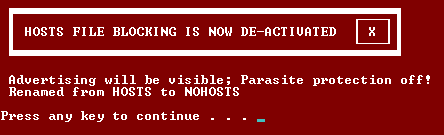
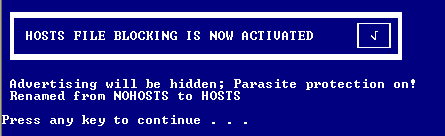
- To use: click (the shortcut) once to rename HOSTS to
NOHOSTS
Click again to rename NOHOSTS back to HOSTS
Note: you will see the above small on-screen message as to
the status.
- Another option would be to use
Hostswitch [screenshot]
(requires .NET be installed)
Locking the HOSTS
File [return to FAQ]
There are many of these hijackers that add their own entries to
your HOSTS file. This is commonly know as redirects, when this
occurs you are most likely infected from within.
Steve C sends along this tip:
ZoneAlarm Pro
includes an option (in the "Firewall" section, "Main" tab,
"Advanced" button) to "Lock host file", which seems to give
extremely effective protection to the HOSTS file.
Editors Note: "locking" the HOSTS file does not
prevent most applications from either deleting the file or editing
the contents. It does add a Layer of Protection, but it is not the
ultimate solution. In any case you should always have a
backup copy of the file handy in case of any unwanted changes.
Personal Web Servers
and HOSTS file
If you are running web server software and you
are getting "Login" pop-up prompts while using the MVPS HOSTS file, the
solution is to use 0.0.0.0 instead of 127.0.0.1 for
all entries except for the first entry: 127.0.0.1
localhost
Editors Note: you can use the "Replace" function in
Notepad to convert the entries, or HostsMan (see below)
has an option for converting the entries to "0.0.0.0". See
screenshot for using HostsMan.
HOSTS Myth: there is no known documentation that proves a
different prefix is faster than "127.0.0.1" vs "0.0.0.0". I've tested "0.0.0.0" vs. "127.0.0.1" and see no noticeable
difference when viewing various websites ... don't believe the
hype that (example) "255.255.255.255" is a null address and
therefore faster ... this is simply not true, as you can
see here that is an assigned address.
Kieran Jacobsen sends along this tip: When using your own web
server, I have actually made a HTML page with [Blocked by MVPS.org
host file]. My web server doesn't have any other services/pages on
port 80 so this is a great solution for me.
Gil sends along this tip: if you are using Firefox, and getting
the "Password Prompt"
- In the Address Bar (type) about:config (Hit Enter)
In the filter (type) ntlm
Double-click on network.automatic-ntlm-auth.trusted-uris
(type) localhost (Hit Enter)
Testing the HOSTS File [return to FAQ]
Win10 users - right-click the Start button and
select: Command Prompt
(type) ping doubleclick.net (press
Enter) You should see "Ping request could not find host
doubleclick.net. Please check the name and try again."
Win8 users - Charms Bar > Search > (type) Command Prompt ... select
Command Prompt (left pane)
(type) ping doubleclick.net (press Enter) You should see
the following [screenshot]
Note: not all sites return a ping request (example) microsoft.com
returns a "Request timed out"
Test #2: paste ad.doubleclick.net into your browser, you should
see the following:
"The page cannot be displayed" (IE only)
"This
site can’t be reached" (Chrome) (screenshot)
Verifying HOSTS File Entries
The HOSTS file entries are verified prior to each new
update. This is accomplished by ensuring that each entry returns a
valid DNS (similar to Nslookup) then these (dead) entries are either
removed or commented. In some cases the hosting server is down, thus returns no DNS. In
other cases the domain may have been suspended for abuse, or the
registered owner has let the domain expire. Domains that are expired,
Parked
or down for extended periods are removed.
Comments in the HOSTS File
The comments are included in the shipped (downloaded) version to allow the
end-user to determine (if needed) why the entry exists. Over time
the amount of entries has grown to a point where it's too easy to
forget why they exist without them. This is also done for obvious legal reasons.
Although the comments do increase the over-all file size ... these
"comments" are not read into memory. If needed there is an
option in HostsMan to remove the "comments"
... however this will remove all the comments, including those that
separate the file into different categories. [screenshot]
Why do I see the
"HOSTS file too large" in SpySweeper
For whatever reason Webroot has decided that the end-user only
needs 500 entries in the HOSTS file. They have stated they are
working on the problem ... until then the work-around is to disable
Hosts File Shield.
Open Spy Sweeper and click Options. Click Shields and click Hosts
File. Uncheck Hosts File Shield
Is
Merging the MVPS HOSTS file with others
recommended?
Not really ... and for several reasons. The main reason is the
MVPS HOSTS file is verified prior to each update, in many cases
there are as many entries removed as there are added. If you simply
Merge the file with your existing file, these removed (dead) entries
are never removed and the file will continue to grow needlessly.
Another reason is how valid are these other HOSTS files? ... many
of which are just copies of someone else's work anyway, and are not
updated on a regular basis.
Editors Note: I do not provide support for issues arising
from the MVPS HOSTS file being modified. This includes Merging with
other hosts files, or 3rd party programs that alter the file.
Do other
programs add entries to the HOSTS file? [return to FAQ]
Yes there are several legitimate programs that add entries to the
HOSTS file. This is why it's important to keep a backup of your
existing HOSTS file. When you update via the "mvps.bat" this will
rename your existing file. If needed you can open HOSTS.MVP and copy
and paste to the new existing HOSTS file any other needed entries.
Why do I see "Access Denied when updating
the HOSTS file? (ZoneAlarm)
There is a problem with certain versions of ZoneAlarm Firewall where the HOSTS file is "locked" even
though that option is unchecked in the options. To resolve this
problem:
1) ZoneAlarm Control Center > Firewall (left pane) > Main (tab in
the right pane)
2) Advanced (button at the bottom) > and find "Lock hosts file"
Check "Lock hosts file". Click OK.
3) Click Advanced (button at the bottom) Uncheck "Lock hosts file".
Click OK.
You should now be able to update the HOSTS file, however until ZA
resolves this problem, on the next Windows restart the file will be
locked again (even if that option is unchecked) ... hopefully ZA
will correct this shortly!
To Update or Edit the HOSTS file for ZoneAlarm Pro or Security
Suite users:
1) Program Panel -> Main -> Program Control -> Custom button -> OSFW
tab.
2) UNcheck the box for OSFW, (Operating System Firewall) then
reboot.
3) Make your changes (edit or update) to the HOSTS file.
4) Open ZAP/ZASS and re-enable OSFW and reboot
Why can't I view
the videos at my favorite sites? [return to FAQ]
Unfortunately Fox News and many other "Network sites"
(NBC, Sci-Fi) have decided to inject commercials or advertisements into their "Free
videos" which are heavily laden with 3rd party ad servers and
trackers. You can see an example
commercial here which plays before whatever video you have
selected, to see just a partial list of the 3rd parties involved
click here. There are so many I couldn't get them all on one
screenshot ... but you get the idea.
The reason this occurs now is [example] CNET was recently purchased by CBS
... and all they are interested in is tracking your movements
via all the 3rd party "data miners" that they run the video link
thru prior to you viewing it ... this included several 3rd party
tracking Cookies.
You can view a screenshot
of all the "ad servers" (highlighted in red) that are running in the
background.
Workaround:
One alternative is to rename the HOSTS file
... which you can do on-the-fly ...
Important! Just don't forget to enable the HOSTS file again after
watching the commercials with your video ...
You can use Hostsman or
Hosts
File Editor to enable/disable the
HOSTS file on the fly [screenshot]
Why do I get an
error trying to Save a webpage in Internet
Explorer?
The best explanation I can give you is ... when the browser tries
to "Save" the page ... it reads the HTML code on the page and NOT
what is actually loaded ... so when there are several items missing,
or blocked in this case, it can not complete the task and quits,
which generates the
Error Saving Web Page.
Workaround: rename the HOSTS file and
try again ... just don't forget to rename it back again ... also the
HOSTS file may not be the cause of the "Error Saving Web
Page", an entry in the (IE8) Restricted Zone
will also cause this as that entry will prevent anything from being
downloaded from that site ... or it may be - Error message:
This Web page could not be saved
Tim H sends along this tip ... another way to save a webpage is
to install one of the free
PDF printer File creators (no longer updated) then you simply choose File > Print
PDF and save as PDF
Folks as I've said before ... anytime after running a scan of any
security related product and the only detection is one or more
entries in the HOSTS file, this is most likely a false-positive and
should be ignored, or excluded from future scans.
There is no known
infection that only affects the HOSTS file!
 Related Utilities
- ZoneAlarm Pro and Security Suite users have a "Lock Hosts"
file option.
However this requires special
instructions to edit or update the HOSTS file.
- Hostswitch is a small utility that you can use to rename or
edit the HOSTS file, also displays the status.
(requires .NET be installed)
Various
Troubleshooting Articles
|